Best Baby Bhangra Video Prompts (Copy & Paste)
Below is our complete collection of heavily tested video prompts optimized for different AI video generation engines. Simply choose your preferred platform, copy the text, and paste it into the prompt box.
1. Video Prompt For Gemini
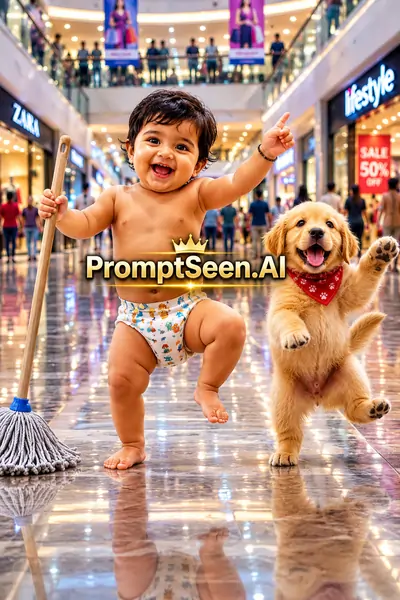
Audio: The child speaks naturally in Hindi: "अजा अजा भंगड़ा पाले , अजा अजा भंगड़ा पाले" Scene: An adorable 2-year-old Indian baby with chubby cheeks, expressive brown eyes, short black hair, and a joyful smile is wearing a cute patterned diaper while happily dancing and holding a mop inside a bright, modern shopping mall. A playful golden puppy dances beside the baby. The mall features shiny reflective tiled floors, stylish storefronts, soft blurred shoppers in the background, and a cheerful atmosphere. Camera: Static eye-level medium shot with smooth, natural camera stability. Lighting: Soft diffused daylight, vibrant colors, cinematic lighting, realistic reflections, photorealistic, 4K HDR, ultra-detailed. Animation: Natural baby movements, realistic facial expressions, gentle body motion, playful puppy actions, and synchronized Bhangra dance. Style: Hyper-realistic, cinematic, high-quality, vibrant colors, family-friendly, visually charming, realistic skin textures, natural shadows, and professional film-grade quality.
2. Google Veo 3 Prompt
3. Kling AI Prompt
4. PixVerse Prompt
5. Hailuo AI Prompt
6. Pika Prompt
7. Runway Gen-4 Prompt
8. Seedance Prompt
Guide Overview
1. Creating Viral Content with AI
The internet is currently obsessed with hyper-realistic, AI-generated short videos, and nothing drives engagement quite like adorable concepts combined with cultural elements. Utilizing an ai dance video generator allows creators to transform imaginative textual descriptions into stunning, cinematic video clips. One of the most trending concepts right now is the "Baby Bhangra" scene, where a cute toddler dances joyfully with a puppy in a modern shopping mall.
To bring this specific vision to life, you don't need expensive equipment. Many users are achieving professional results by using an ai dance video generator free of cost. By feeding these powerful engines highly descriptive prompts that specify camera angles, lighting, and physics, the resulting animation becomes incredibly lifelike and ready for social media.
2. Optimizing Your Video Generation Workflow
Achieving realistic body physics in video generation requires the right tool. You will want to use a free motion control ai video generator like Kling AI or Runway Gen-4. These platforms understand complex movement descriptors like "synchronized Bhangra dance" and "playful puppy actions," ensuring the characters don't warp or glitch during the animation.
For creators looking to reverse-engineer viral videos they find online, using a youtube video to notes converter ai is a fantastic strategy to extract visual details and turn them into text prompts. Once your raw video is generated using our structural templates below, you can take the footage into an editor and apply a trending capcut video Prompt to add music, text, and final stylistic transitions.
PromptBhai के साथ जुड़ें
रोज़ नए वायरल AI प्रॉम्प्ट, सबसे पहले आपके पास
4. Frequently Asked Questions (FAQ)
What is an ai dance video generator?
An AI dance video generator is a tool that uses text prompts or reference images to create realistic, animated videos of characters dancing. Tools like Google Veo, Kling AI, and Runway Gen-4 excel at this.
How can I find an ai dance video generator free to use?
Many platforms like Hailuo AI, PixVerse, and certain tiers of Kling AI offer daily free credits. You can paste our provided prompts into these platforms to generate high-quality dance videos without upfront costs.
Which free motion control ai video generator is best for this prompt?
For complex movements like a baby performing Bhangra alongside a puppy, tools with advanced motion control like Kling AI and Runway Gen-4 are highly recommended to keep the animation smooth and realistic.
Can I use these prompts alongside a capcut video Prompt?
Yes! Once you generate the raw video clip using these text prompts, you can import the final footage into CapCut and apply a trending capcut video Prompt or template to add text, music, and transitions.
How do I make the baby lip-sync the Hindi audio accurately?
Our prompts explicitly instruct the AI that the baby is singing in Hindi. For perfect lip-syncing, use video generators that support direct audio uploads (like Google Veo 3 or specialized lip-sync AI tools) alongside the text prompt.
Can a youtube video to notes converter ai help me write better prompts?
Absolutely. If you see a viral dance video, you can use a youtube video to notes converter ai to transcribe the visual elements and actions into text notes, which you can then format into a structured AI video prompt.