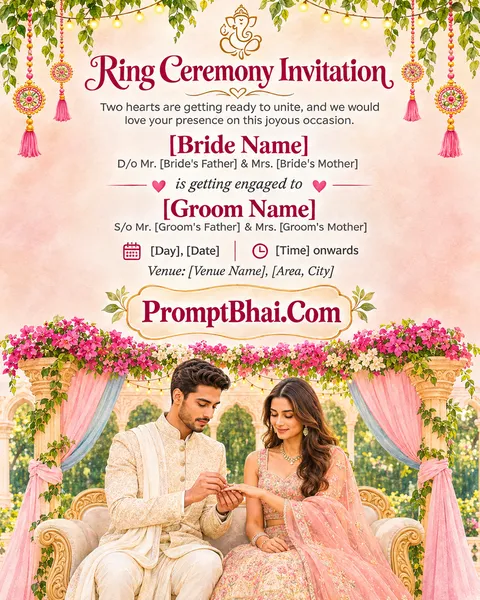
Start your engagement announcements with classic Indian warmth. Built in a tall 9:16 portrait layout ideal for WhatsApp status and family broadcasts, this ring ceremony invitation card prompt pairs a gentle cream-and-peach watercolour background with a carved floral mandap where the groom slips the engagement ring onto the bride's finger.
Exactly 2 people in this image — the bride-to-be and the groom-to-be. Do not add any guests or extra people.
Create a vertical 9:16 digital Ring Ceremony invitation card in a soft hand-drawn illustration style with light watercolour texture.
Background: smooth warm cream-to-light-peach gradient.
Top decoration: hanging green vines, warm fairy-light strings, and colourful bead garlands with pink tassels and small round mandala hangings on both top corners. A small golden-brown Lord Ganesha line icon at the top centre.
Text (upper half, centre-aligned; headings in an elegant magenta-red decorative serif, details in a clean grey sans-serif):
"Ring Ceremony Invitation"
"Two hearts are getting ready to unite, and we would love your presence on this joyous occasion."
"[Bride Name]"
"D/o Mr. [Bride's Father] & Mrs. [Bride's Mother]"
"is getting engaged to" (with a small pink heart icon on each side)
"[Groom Name]"
"S/o Mr. [Groom's Father] & Mrs. [Groom's Mother]"
"[Day], [Date]"
"[Time] onwards"
"Venue: [Venue Name], [Area, City]" (italic)
Lower half illustration: a floral mandap with carved golden-wood pillars wrapped in green ivy, soft pink and powder-blue drapes tied at the sides, a canopy of magenta bougainvillea and white flowers, and hanging string lights. Behind it, carved cream stone arches and a soft green garden. Under the mandap, the pair sits on a carved cream sofa: the groom in an ivory sherwani with a white dupatta, the bride in a pastel peach-gold embroidered lehenga with a pink dupatta and jewellery. He gently slips the engagement ring onto her finger; both look down at the ring with soft smiles.
Faces: if a photo is attached, keep both faces a clear likeness of the attached photo (same face shape, features, hairstyle and skin tone), drawn in this same illustration style. If no photo is attached, create a graceful Indian pair.
Spell all text exactly as written. No extra text, no watermark, no logo.
Exactly 2 people in this image — no guests, no extra people anywhere.
2. Sage Watercolour Lantern Romance
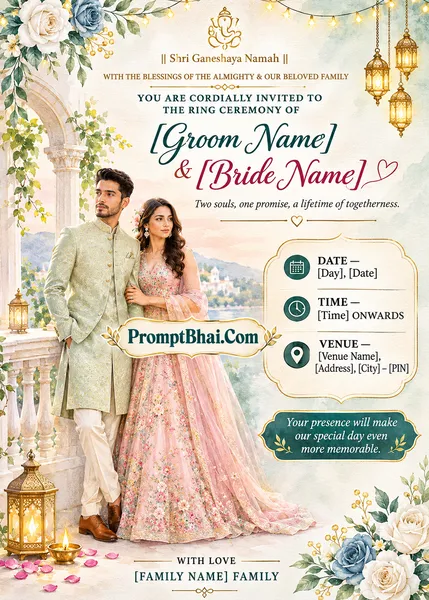
For couples who prefer a serene pastel theme over heavy reds and golds, this ring ceremony invitation prompt for Gemini blends pale sage-mint washes, glowing Moroccan lanterns, and delicate roses into an artistic 5:7 digital invitation complete with a neat date, time, and venue panel.
Exactly 2 people in this image — the bride-to-be and the groom-to-be. Do not add any guests or extra people.
Create a portrait (5:7) Ring Ceremony invitation card in a soft, elegant watercolour painting style.
Background: pale sage-mint and ivory watercolour wash with fine paper texture and light gold speckles. White and blue-grey roses with green leaves at the top-left and bottom-right corners. A warm fairy-light string across the top. Three golden Moroccan-style lanterns hanging on the right side. A white arched doorway with a balustrade on the left, with a small glowing lantern. A brass lantern and a lit diya with scattered rose petals at the bottom-left.
Top centre: a small gold Lord Ganesha icon, then:
"|| Shri Ganeshaya Namah ||"
"WITH THE BLESSINGS OF THE ALMIGHTY & OUR BELOVED FAMILY" (small gold caps)
"YOU ARE CORDIALLY INVITED TO THE RING CEREMONY OF" (dark teal caps)
"[Groom Name]" (large dark teal-green script)
"& [Bride Name]" (large deep rose script, with a small heart outline)
"Two souls, one promise, a lifetime of togetherness." (small serif, with a thin gold divider and tiny heart below)
Right side info panel: a cream rounded panel with a thin gold border and three dark-teal circle icons (calendar, clock, location pin):
"DATE — [Day], [Date]"
"TIME — [Time] ONWARDS"
"VENUE — [Venue Name], [Address], [City] – [PIN]"
Bottom right: a dark teal ribbon plaque with gold edges: "Your presence will make our special day even more memorable."
Bottom centre: "WITH LOVE" and "[FAMILY NAME] FAMILY" in dark teal caps.
Left half: full-length standing pair in a realistic painted-illustration style — the groom in a mint-green embroidered sherwani, cream churidar and brown loafers; the bride in a blush-pink embroidered lehenga with a sheer pink dupatta, long wavy hair and a floral hair accessory. They hold hands and look into each other's eyes, smiling; her engagement ring is visible.
Faces: if a photo is attached, keep both faces a clear likeness of the attached photo (same face shape, features, hairstyle and skin tone), drawn in this same painted style. If no photo is attached, create a graceful Indian pair.
Spell all text exactly as written. No extra text, no watermark, no logo.
Exactly 2 people in this image — no guests, no extra people anywhere.
3. Ivory Caricature Save the Date
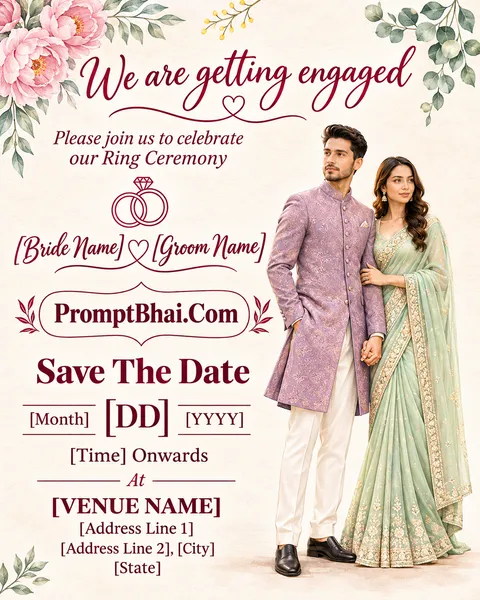
Modern couples love minimalist stationery with a playful twist. This clean engagement invitation card AI prompt features crisp wine-maroon calligraphy on warm ivory paper, soft watercolour peonies, and a charming full-length caricature of the bride and groom standing hand in hand.
Exactly 2 people in this image — the bride-to-be and the groom-to-be. Do not add any guests or extra people.
Create a portrait (A4, 1:1.41) Ring Ceremony "Save The Date" invitation card with a clean, modern look.
Background: plain warm ivory paper texture. Top-left corner: soft pink watercolour peonies with grey-green leaves. Top-right corner: a watercolour eucalyptus branch. A few tiny yellow watercolour buds near the top centre. Plenty of clean empty space.
All text in deep maroon / wine colour:
"We are getting engaged" (large flowing handwritten script)
"Please join us to celebrate our Ring Ceremony" (italic serif, two lines)
A maroon line-art icon of two interlocked rings with a diamond on top.
"[Bride Name] ♡ [Groom Name]" (large script, the two names joined by a continuous heart-shaped line flourish)
Lower left, left-aligned block:
"Save The Date" (bold serif)
"[Month] [DD] [YYYY]" — the day number big in the middle, month and year with thin maroon lines above and below
"[Time] Onwards"
"At"
"[VENUE NAME]" (bold caps)
"[Address Line 1]"
"[Address Line 2], [City]"
"[State]"
Lower right: a full-length digital caricature of the pair standing close and holding hands — the bride in a mint-green saree with a cream border, the groom in a lilac-mauve embroidered Indo-western sherwani with white trousers and black shoes. Bold clean outlines, smooth soft shading, slightly larger heads, warm smiles.
Faces: if a photo is attached, the caricature faces must be a clear, recognisable likeness of the attached photo (same face shape, features, hairstyle and skin tone). If no photo is attached, create a friendly Indian pair.
Spell all text exactly as written. No watermark, no phone numbers, no logo, no design number, no extra text.
Exactly 2 people in this image — no guests, no extra people anywhere.
4. Golden Yellow Photo Frame
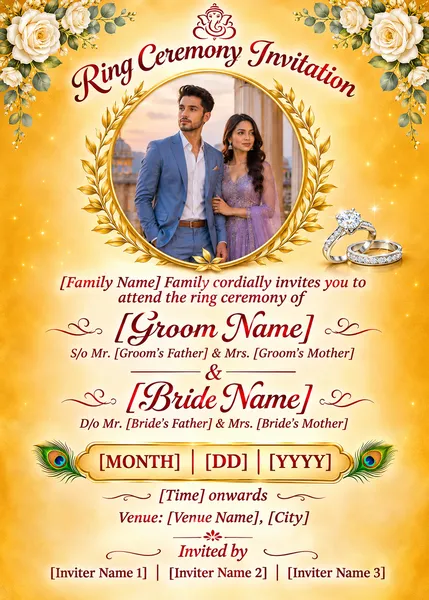
Want your actual photograph to shine at the center of your family invite? This rich ring ceremony invitation card with photo template sets a real, untouched couple portrait inside a circular gold laurel wreath, surrounded by white roses, diamond engagement rings, and a peacock-feather date ribbon.
Exactly 2 people in this image — the bride-to-be and the groom-to-be. Do not add any guests or extra people.
Create a portrait (A4, 1:1.41) Ring Ceremony invitation card.
Background: rich golden-yellow to mustard gradient with a softly glowing lighter centre and tiny gold sparkle stars. White roses with eucalyptus leaves in both top corners.
Top: a small maroon Lord Ganesha icon at the top centre, and the words "Ring Ceremony Invitation" curved in an arch above the photo frame in maroon script.
Photo frame: a large circular frame with a gold laurel-leaf wreath border in the upper centre. A pair of shiny silver diamond engagement rings beside the frame on the right.
Photo inside the frame: if a photo is attached, place it inside the circle exactly as it is — keep both faces 100% original (same features, skin, hair and expression), no beautifying, no face changes. It must look like a real photograph, not AI-generated and not a cartoon. If no photo is attached, use a natural, real-looking photo of a smiling Indian pair posing cheek to cheek.
Text (maroon decorative script with a soft cream glow, centre-aligned):
"[Family Name] Family cordially invites you to attend the ring ceremony of"
"[Groom Name]" (large)
"S/o Mr. [Groom's Father] & Mrs. [Groom's Mother]"
"&"
"[Bride Name]" (large)
"D/o Mr. [Bride's Father] & Mrs. [Bride's Mother]"
Date ribbon: a light golden horizontal band reading "[MONTH] | [DD] | [YYYY]", with a peacock feather on each end.
"[Time] onwards"
"Venue: [Venue Name], [City]"
"Invited by"
"[Inviter Name 1] | [Inviter Name 2] | [Inviter Name 3]"
Spell all text exactly as written. No website, no watermark, no logo, no extra text.
Exactly 2 people in this image — no guests, no extra people anywhere.
5. Cute Chibi Love Hearts
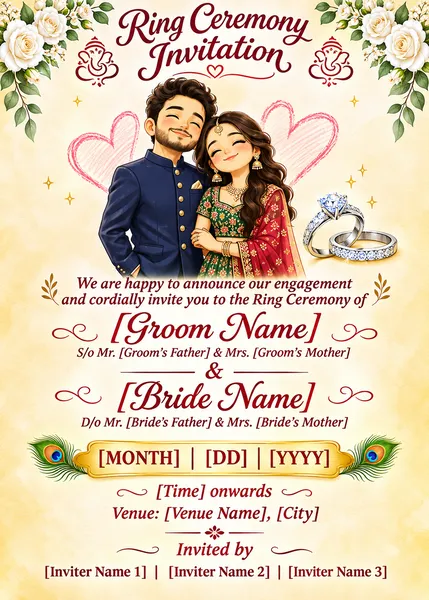
Looking for a cheerful, light-hearted card that brings an instant smile to friends and cousins? This adorable ring ceremony invitation prompt for ChatGPT and Gemini draws a rosy-cheeked chibi couple dressed in festive Indian outfits in front of twin pink crayon hearts, balanced with formal family details below.
Exactly 2 people in this image — the bride-to-be and the groom-to-be. Do not add any guests or extra people.
Create a portrait (A4, 1:1.41) Ring Ceremony invitation card with a cute, cheerful look.
Background: soft pastel cream-yellow with a light paper texture and a few small gold sparkle stars. White roses with eucalyptus leaves at both top corners.
Top: "Ring Ceremony Invitation" in elegant maroon calligraphy script over two lines, with a small maroon Lord Ganesha icon on each side.
Centre illustration: a cute chibi cartoon pair (big heads, small bodies, rosy cheeks, happy closed-eye smiles) standing side by side, his arm around her shoulder — the bride in a dark green and maroon embroidered lehenga with a red dupatta and maang tikka, the groom in a navy blue bandhgala / Nehru jacket outfit. Behind them, two large pink hand-scribbled crayon-style hearts. A pair of silver diamond engagement rings on the right.
Faces: if a photo is attached, make the chibi faces resemble the attached photo (hairstyle, beard or no beard, glasses, skin tone). If no photo is attached, give the groom a neat beard.
Text (maroon decorative script with a soft cream glow, centre-aligned):
"We are happy to announce our engagement and cordially invite you to the Ring Ceremony of"
"[Groom Name]" (large)
"S/o Mr. [Groom's Father] & Mrs. [Groom's Mother]"
"&"
"[Bride Name]" (large)
"D/o Mr. [Bride's Father] & Mrs. [Bride's Mother]"
Date ribbon: a light golden horizontal band reading "[MONTH] | [DD] | [YYYY]", with a peacock feather on each end.
"[Time] onwards"
"Venue: [Venue Name], [City]"
"Invited by"
"[Inviter Name 1] | [Inviter Name 2] | [Inviter Name 3]"
Spell all text exactly as written. No website, no watermark, no logo, no extra text.
Exactly 2 people in this image — no guests, no extra people anywhere.
6. Introduction – Ring Ceremony Invitation Prompts
Planning an engagement ceremony comes with a joyful rush of decisions—picking the venue, choosing matching outfits, finalizing the guest list, and finding a ring ceremony invitation card that feels truly personal. Not long ago, custom couple illustrations or luxury gold-foil cards meant hiring a designer and waiting days for revisions. Today, invitation card making online has become effortless thanks to AI image generators like Google Gemini and ChatGPT.
Whether you want a traditional Indian engagement invite under a floral mandap, a dreamy sage-green watercolour card, a clean ivory caricature Save the Date, a real couple photo frame, or a cute chibi cartoon design, these five copy-paste ring ceremony invitation prompts give you designer-grade results in under a minute. Every template is structured with clear English invitation typography, exact couple-count controls, and balanced margins so your finished digital invitation looks crisp on WhatsApp and ready for print. Once your card is generated, you can easily prepare or shrink heavy image files for fast WhatsApp sharing using our Invitation Card Image Tool (JPEG Compressor), and if you want to draft heartfelt Hindi captions or online invitation card matter to send alongside your card, our free Hindi Typing Tool helps you type clean Devanagari text in seconds.
7. How to Create Ring Ceremony Invitation Cards with Gemini & ChatGPT
You do not need graphic design software or paid templates to turn any engagement invitation prompt above into a finished card. Follow these four straightforward steps:
Step 1: Pick Your Card Style: Choose the layout that fits your celebration—9:16 vertical for WhatsApp status (Prompt 1), soft watercolour elegance (Prompt 2), minimalist caricature Save the Date (Prompt 3), real couple portrait frame (Prompt 4), or playful chibi art (Prompt 5).
Step 2: Fill In Your Details: Tap the Copy button, paste the prompt into your phone's notes app, and replace every bracketed placeholder—[Bride Name], [Groom Name], parents' names, [Date], [Time], and [Venue Name]—with your exact details. You can also add an RSVP contact line right below the venue.
Step 3: Attach a Couple Photo (Optional): Open Google Gemini or ChatGPT. If you want your real faces inside the Golden Yellow Photo Frame (Prompt 4) or your personal likeness drawn into the illustrated cards, upload one clear, well-lit photo of the bride and groom together.
Step 4: Generate and Review: Paste your customized ring ceremony invitation card in English prompt into the chat and hit send. Within seconds, the AI builds a complete engagement card with floral decoration, balanced spacing, and readable typography ready to save and share.
8. Tips for Creating Beautiful AI Engagement Invitation Cards
A tiny typo in a date or venue name can confuse guests, so a quick quality check goes a long way when creating an AI ring ceremony invitation card:
Keep Every Detail Short and Clean: AI typography looks sharpest when venue addresses and inviter names stay concise. Instead of a three-line street address, write the banquet hall name, neighborhood, and city cleanly so the lettering stays large and legible on mobile screens.
Proofread Before Forwarding on WhatsApp: Always double-check the spelling of both families' names, the day of the week, the date, and the ceremony start time. If Gemini or ChatGPT slightly warps one letter, hit Regenerate once with the exact same prompt—the second render usually fixes small text glitches immediately.
Choose a Front-Facing Couple Photo: When creating a ring ceremony invitation card with photo, pick a sharp, evenly lit picture where both faces look toward the camera without heavy filters or sunglasses. That ensures the circular gold wreath in Prompt 4 preserves both faces naturally.
Match the Card Theme to Your Decor: Feel free to tweak small colour words inside the prompt—swap pastel peach for royal burgundy, or mint green for navy blue—to match your real engagement outfits and stage theme while keeping the rest of the layout instructions untouched.
9. FAQ – Ring Ceremony Invitation Prompts
How do I make a Ring Ceremony invitation card using Gemini or ChatGPT?
Simply copy any Ring Ceremony invitation prompt from this page, replace the bracketed details such as the couple names, parents' names, event date, time, and venue, and paste the text into Google Gemini or ChatGPT. If you want your real faces or likeness included, attach a clear couple photo before sending.
Can I create a Ring Ceremony invitation card with our real couple photo?
Yes. Prompt 4 (Golden Yellow Photo Frame) is built to place your original couple photograph untouched inside a golden laurel wreath frame without beautifying or altering your faces. Prompts 1, 2, 3, and 5 also support an attached photo to draw your real likeness in watercolour, caricature, or chibi styles.
Will the AI spell the bride, groom, and venue names correctly?
Modern versions of ChatGPT and Gemini render English invitation typography very accurately when every line is clearly placed inside quotation marks. Always review the date, time, and spelling of every name closely; if a letter looks off, regenerate once with the exact same prompt.
Which prompt is best for a WhatsApp Ring Ceremony invitation?
Prompt 1 (Royal Mandap Ring Exchange) uses a tall 9:16 vertical layout designed specifically for full-screen WhatsApp status and mobile sharing. Prompts 2 through 5 use classic 5:7 and A4 portrait layouts that look crisp both on WhatsApp chats and as printed engagement cards.
Can I customize the colours, outfits, or add an RSVP line?
Absolutely. You can easily swap outfit colours—such as changing a mint-green sherwani to ivory or a peach lehenga to royal red—or add an RSVP line with your family contact number right below the venue line before generating the card.
Do I have to upload a couple photo to use these engagement invitation prompts?
No. Every prompt includes a built-in fallback instruction: if you do not attach a photo, the AI automatically illustrates or photographs a graceful Indian couple matching the card theme so you still get a finished engagement card.
Are these Ring Ceremony invitation prompts free to copy and share?
Yes, every Ring Ceremony invitation card prompt on PromptBhai is 100% free to copy, edit, and use for personal celebrations, family WhatsApp groups, and digital Save the Date announcements.