Table of Contents
- 1. छठी मैया की मूर्ति के सामने आरती
- 2. घाट पर छठी मैया की वेदी
- 3. सूर्य की किरणों में छठी मैया का आशीर्वाद
- 4. कोसी के पास छठी मैया का पूजन
- 5. छठी मैया – दिव्य रूप (बिना फोटो, wallpaper के लिए)
- 6. Introduction – Chhathi Maiya Photo Editing Prompts
- 7. How to Use Chhathi Maiya Prompts in Gemini & ChatGPT
- 8. How to Create Chhathi Maiya Devotional Wallpapers with AI
- 9. Tips for Creating Realistic Chhathi Maiya AI Images
- 10. FAQ – Chhathi Maiya Photo Editing Prompts
1. छठी मैया की मूर्ति के सामने आरती (Gemini / ChatGPT)
Experience the divine aura of temple aarti at home! This stunning Chhathi Maiya Aarti AI image prompt gracefully places your face into a photorealistic scene of devotion, offering prayers to a beautifully decorated idol adorned in a red and gold saree.
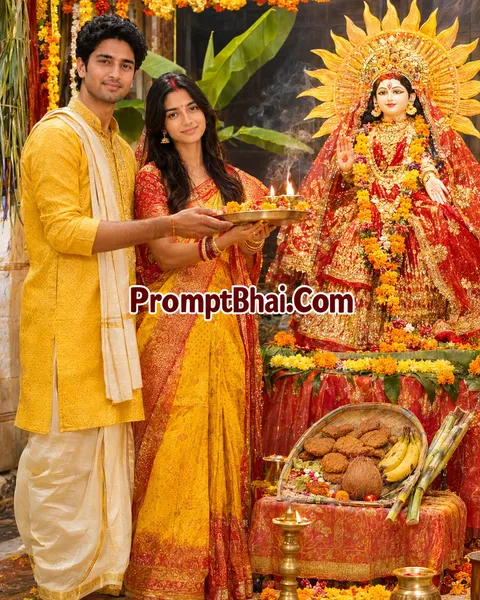
Use the uploaded photo as reference. Keep exactly the same number of people as in the reference photo — do not add or remove anyone. Keep every face 100% identical to the reference (same features, skin tone, expression), only change the clothes and background. Chhathi Maiya must appear only as a decorated idol, not as a living person. Performing aarti with a brass diya plate before a beautifully decorated idol of Chhathi Maiya on a home altar — the idol in a red and gold saree with a crown, a sun disc behind her, marigold garlands, sindoor, a bamboo soop with thekua, bananas, coconut and sugarcane placed at her feet. Traditional Chhath attire in yellow and red matching each person's existing style of dressing — a saree with sindoor for feminine clothing, a kurta with dhoti for masculine clothing. Warm diya light, incense smoke, DSLR photo, real skin texture, true-to-life colours. Final check: same number of people as the reference photo, faces unchanged, fully photorealistic, no AI look.
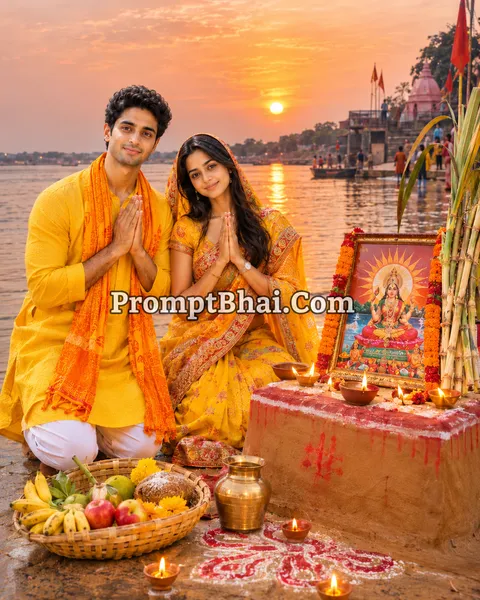
2. घाट पर छठी मैया की वेदी
Celebrate the pure traditions of the Chhath Ghat! Acting as a perfect Chhath Puja Vedika setup, this prompt generates an image of you kneeling respectfully before a mud-plastered vedi featuring a framed painting of the goddess at sunset.
3. सूर्य की किरणों में छठी मैया का आशीर्वाद
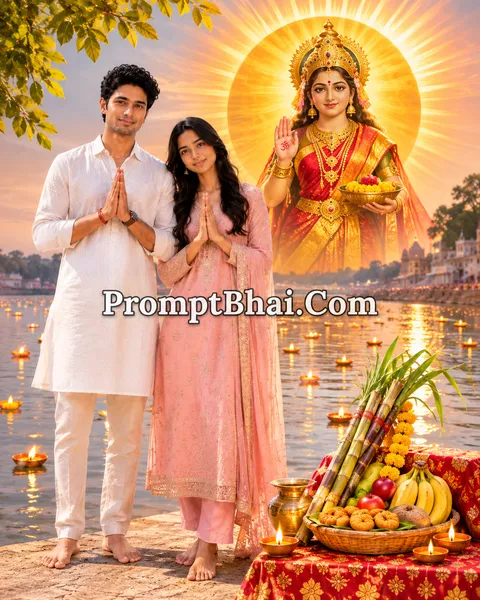
Capture the exact moment the divine blessings descend! This Chhathi Maiya blessing photo prompt masterfully illuminates your face with natural golden lens flares while you offer the traditional Soop to the rising sun in the river.

4. कोसी के पास छठी मैया का पूजन
Perform the sacred Kosi Bharai ritual with ease! This highly realistic Chhath Puja Kosi Puja photo prompt generates a beautiful night courtyard setup, framing you perfectly alongside five tall sugarcane sticks and earthen lamps.

5. छठी मैया – दिव्य रूप (बिना फोटो, wallpaper के लिए)
Welcome the divine presence into your digital life! This text acts as a pure Chhathi Maiya wallpaper prompt. No reference photo is needed—simply copy and paste this into an AI generator to create a breathtakingly detailed, 9:16 devotional portrait of the Goddess.
PromptBhai के साथ जुड़ें
रोज़ नए वायरल AI प्रॉम्प्ट, सबसे पहले आपके पास
6. Introduction – Chhathi Maiya Photo Editing Prompts
Welcome to the ultimate devotional collection dedicated to the great festival of purity and faith—Chhath Puja 2026! Gathering all the traditional elements like sugarcane, Bamboo Soops filled with Thekua, and setting up the beautiful Kosi can be a daunting task for photography. But this year, you can bypass the heavy setups. By utilizing our highly advanced Chhathi Maiya AI photo editing prompts, you can digitally blend your family's faces into majestic, fully decorated temple and ghat scenes.
If you have enjoyed the flawless realism of our Diwali Prompt Collection or the spiritual templates available in our Religion Prompt Collection, these new Chhath instructions will leave you mesmerized. We have engineered these text formulas specifically for top-tier image generators like Google Gemini Advanced and ChatGPT Plus (DALL-E 3). Whether you want to generate a Chhathi Maiya HD images scene showing you performing aarti, or simply wish to create a divine, standalone Chhathi Maiya wallpaper prompt for your mobile phone, these templates guarantee cinematic perfection without requiring any Photoshop skills.
7. How to Use Chhathi Maiya Prompts in Gemini & ChatGPT
Creating your customized, highly photorealistic Chhath Puja photo is an incredibly simple and rewarding process. Just follow these four easy steps:
- Step 1: Choose Your Darshan: Scroll through the 5 distinct templates provided above. Select the scene that resonates with your devotion, whether it is offering prayers at a 'Chhath Puja Vedika' or standing amidst golden lens flares to receive divine blessings.
- Step 2: Copy the AI Instruction: Click the 'Copy' button located right below the demo image of your chosen Chhathi Maiya prompt for ChatGPT. The entire detailed formula will be securely copied to your device's clipboard.
- Step 3: Upload a Clear Reference (For Prompts 1-4): Open Google Gemini Advanced or ChatGPT Plus. Use the attachment icon to upload a clear, well-lit reference photo of yourself, your partner, or your family. Ensure no heavy filters are applied to the face.
- Step 4: Paste and Generate: Paste the copied text into the chat box and hit enter. The AI will strictly follow the 'Face Preservation' rules, maintaining your exact identity while generating a breathtaking Chhath Puja picture within seconds!
8. How to Create Chhathi Maiya Devotional Wallpapers with AI
If you do not want to insert your own photo and are simply looking for a gorgeous, high-resolution devotional image for your mobile background, we have you covered. Prompt #5 in our list is uniquely designed as a Chhathi Maiya divine portrait prompt.
- Because this template does not involve face-swapping, you do not need to upload any reference photo.
- Simply copy Prompt #5, paste it directly into the chat box of ChatGPT or Gemini, and hit enter.
- The AI will instantly render a beautifully rich, 9:16 vertical Chhath Puja in Hindi devotional wallpaper featuring the Goddess in her glorious motherly form, perfect for saving and sharing!
9. Tips for Creating Realistic Chhathi Maiya AI Images
Traditional Indian festivals have intricate rituals that AI sometimes struggles to comprehend fully on the first try. Follow these expert tips to ensure your generated Chhathi Maiya photo prompt for Gemini is flawless:
- Never Alter the Face Rules: For the personalized prompts (1 to 4), every text block explicitly states "Keep every face 100% identical to the reference". Do not delete these lines! These strict constraints force the AI to map your true identity accurately instead of creating a morphed or highly 'beautified' generic face.
- Goddess Presentation Rules: We have specifically included instructions like "Chhathi Maiya must appear only as a decorated idol" or "only as a painted framed image". This prevents the AI from generating the Goddess standing right next to you as a real human, maintaining the authentic devotional feel of a Temple Aarti or Kosi Puja.
- Use the Regenerate Button: If the AI hallucinates an extra piece of Sugarcane or misinterprets the Bamboo Soop in your Chhath Puja holiday portrait, do not panic. Simply hit the 'Regenerate' button using the exact same prompt; subsequent attempts usually fix these minor glitches perfectly.